


















How to Get the Best from Your ESA Athena S3: A Smarter Way to Manage Home Energy
September 09, 2026


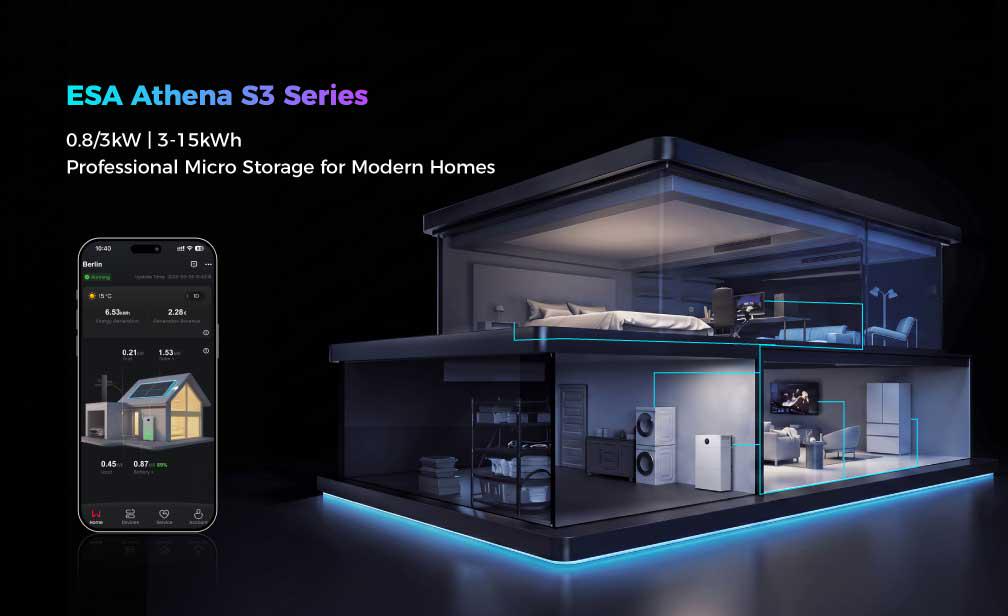
ESA Athena S3 brings solar generation, battery storage, household consumption and optional time-variable electricity prices into one home-energy system. The best result is not the highest power number at every moment. It is using more of your own solar energy when it is valuable, keeping a sensible backup reserve and giving the system accurate information so it can make good decisions.
The Simple Strategy
Choose the correct country-approved connection, start in Self-consumption mode, verify the meter and tariff data, observe one normal week, and only then add TOU or AI optimisation.
Which Installation Scenario Is Right for Your ESA Athena S3?
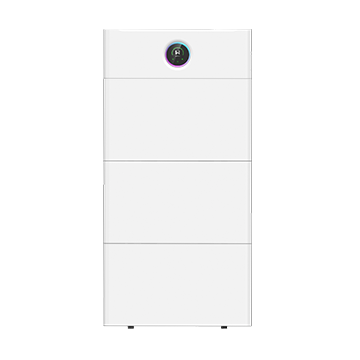
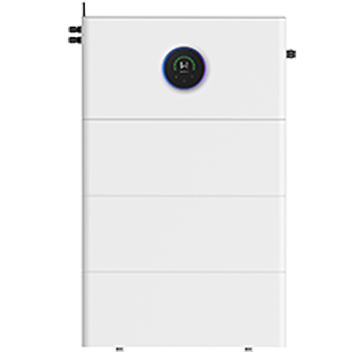
ESA Athena S3 is designed for two different use cases: a compact plug-in solar configuration and a higher-power professional home-storage configuration. Product documentation describes an 800 W plug-in scenario and a professional configuration of up to 3 kW. One battery module provides 3 kWh of rated storage, and the system can be expanded to five modules, or 15 kWh, where the local product configuration and installation permit it.
These scenarios must not be mixed casually. The 3 kW configuration requires professional wiring, commissioning and local grid approval. Do not change the output-power setting yourself, and do not assume that selecting a lower value in an app automatically makes a higher-capability device a simplified plug-in system.
DACH plug-in rules at a glance
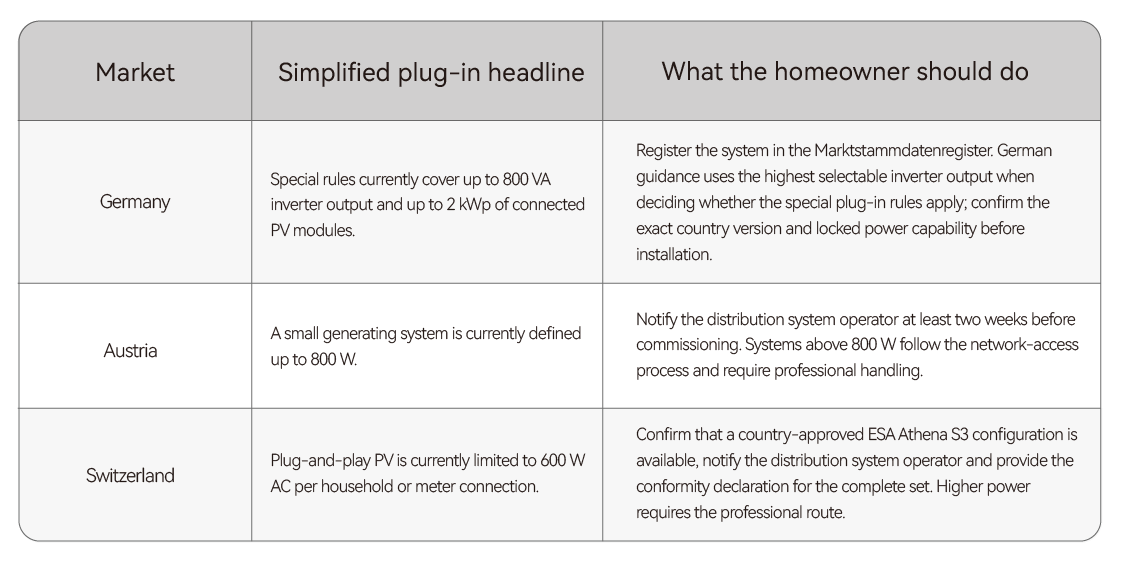
Local landlord, building, electrical and municipal requirements can also apply. Regulations change, so check the official source and your local network operator before commissioning. Never connect through a multi-socket adaptor or an improvised extension arrangement. If the age or capacity of the household circuit is uncertain, ask a qualified electrician to inspect it.
Does Your ESA Athena S3 Have the Right Energy Data?
An energy-storage system can only optimise what it can measure. ESA Athena S3 uses a compatible energy meter to understand the flow between the home and the grid. Depending on the approved system design, the meter can communicate wirelessly or through RS485. A compatible home energy management system (HEMS) is also required for AI mode.
Check that household load, PV power, battery power and grid power all look plausible in the energy-management interface.
Make sure the meter direction and phase allocation were verified during commissioning. A reversed reading can make the battery charge or discharge at the wrong time.
Keep the router connection reliable and confirm the correct time zone. Time-based schedules and dynamic-price plans depend on an accurate clock.
Enter the electricity tariff you actually pay, including the applicable supplier add-ons or fees supported by the interface - not just a wholesale spot-price curve.
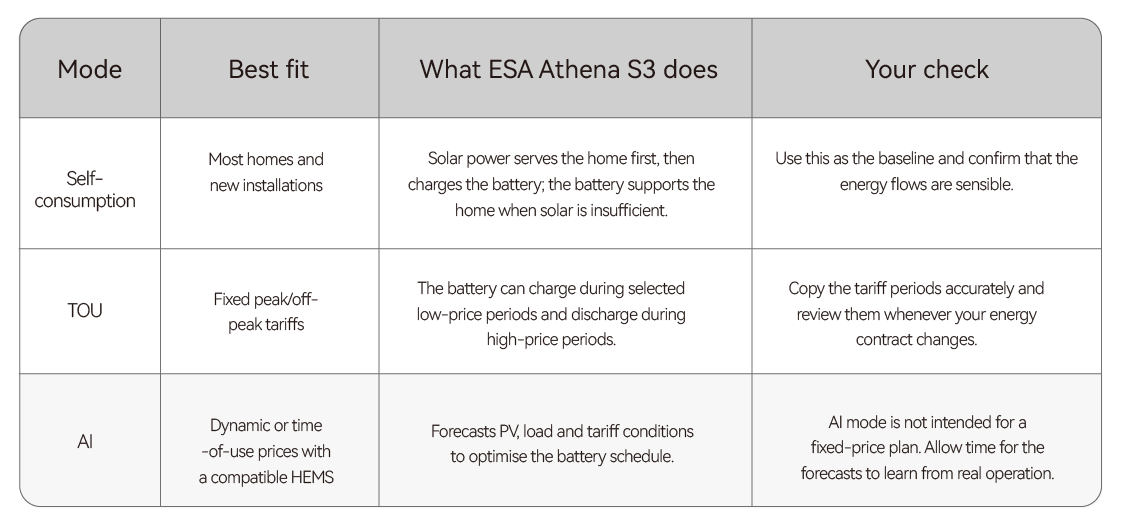
Which ESA Athena S3 Operating Mode Should You Choose?
Quick Rule
No price signal? Start with Self-consumption. Predictable low- and high-price periods? Use TOU. A compatible HEMS plus a time-variable or dynamic tariff? AI may be appropriate after the meter and tariff data have been verified.
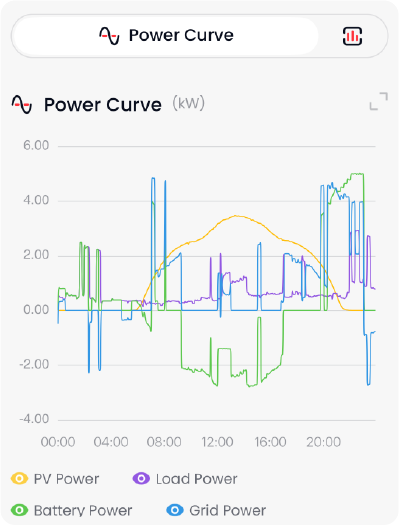
Figure 1. Example daily power curve in the GoodWe energy-management interface. Illustrative screen supplied with the source pack. Colours, sign conventions, menus and values may differ by app version, market and configuration.
How to read the daily curve
PV power should rise during daylight hours and fall toward evening. Shading and weather will make the curve less smooth.
When PV exceeds household demand, the battery should normally charge before avoidable energy is exported, subject to the selected mode and limits.
When PV is low, the battery can reduce grid import until it reaches the configured reserve or operating limit.
If grid import increases when you expect battery discharge, first check the selected mode, reserve setting, meter data and active schedules. Ask the installer to investigate persistent inconsistencies.
How Can You Match Home Energy Use to Solar Availability?
Storage gives you flexibility, but using energy directly while the sun is available is still efficient. Where practical, schedule flexible appliances - such as a dishwasher or washing machine - during the solar window. The grid will automatically supply any shortfall when an appliance uses more power than the solar-and-battery system can provide.
Look at daily energy, grid import and battery behaviour rather than chasing a brief power peak.
If the battery regularly becomes full early in the day, shift more flexible consumption into the solar window or review export and tariff settings.
If the battery is empty well before the evening is over, reduce avoidable evening loads, review the reserve setting or assess whether more storage is justified.
Keep PV modules free from avoidable shade and follow the module supplier's cleaning and mounting instructions. Do not access unsafe balcony or roof areas to clean modules.
When Should You Use TOU or Dynamic Tariffs?
TOU mode is useful when your tariff has predictable low-price and high-price periods. AI mode adds forecast-based optimisation when a compatible HEMS and a time-of-use or dynamic tariff are available. The economic benefit comes from the complete price difference after taxes, supplier fees and conversion losses - not from the market price alone.
Check the import and export tariffs separately. They may come from different contracts or have different add-ons.
Avoid overlapping or contradictory charge and discharge schedules.
Review tariff settings after a supplier change, daylight-saving change or app update.
Do not override the system repeatedly based on one unusually cheap or expensive hour. Judge performance over several representative days.
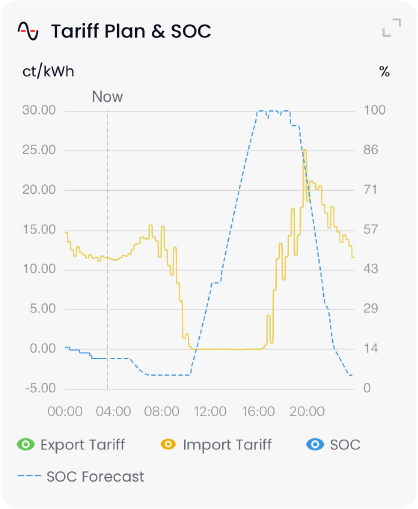
Figure 2. Example import-price curve and forecast battery state of charge (SOC).
This example illustrates the scheduling principle only; it is not a savings guarantee or a recommended tariff plan.
In this type of view, the tariff curve shows when grid electricity is relatively cheap or expensive, while the SOC forecast shows the planned battery level. A sensible plan may preserve or charge the battery before an expensive period and discharge it later, while still respecting the backup reserve and system limits.
How Much Battery Reserve Should You Keep for Backup?
A higher battery reserve keeps more energy available for a possible outage, but leaves less energy for daily bill optimisation. A lower reserve can increase self-consumption and tariff shifting, but reduces the energy retained for backup. Choose the balance with your installer based on the loads that matter and the typical outage risk at your home.
During a grid outage, the normal grid-connected household circuit must disconnect for anti-islanding safety. Only loads connected to the approved BACK-UP output can receive battery power, where that function has been professionally installed and commissioned.
Treat the BACK-UP output as a critical-load supply, not automatically as whole-home backup.
Consider the combined running power and start-up demand of connected appliances. Large heating, cooking or motor loads may exceed the available backup capability.
Test backup operation only with the installer-approved procedure. Do not create an outage by randomly unplugging equipment or operating breakers.
After a real outage, allow the battery to recover before returning to aggressive tariff optimisation.
How Long Should You Let AI Mode Learn Before Judging It?
AI mode uses a compatible HEMS and the configured tariff plan to forecast solar production, household demand and battery requirements. During the initial information-gathering period, the forecast can differ from actual operation. That is normal: weather, household routines and dynamic prices are not perfectly predictable.
Begin with correct meter, tariff and time-zone settings.
Leave the mode running across several representative days instead of switching back and forth every few hours.
Compare forecast and actual curves, but focus on trends: lower expensive grid import, sensible battery cycling and enough reserve for your needs.
Investigate repeated large errors, missing data or unexpected battery behaviour with your installer or GoodWe service channel.
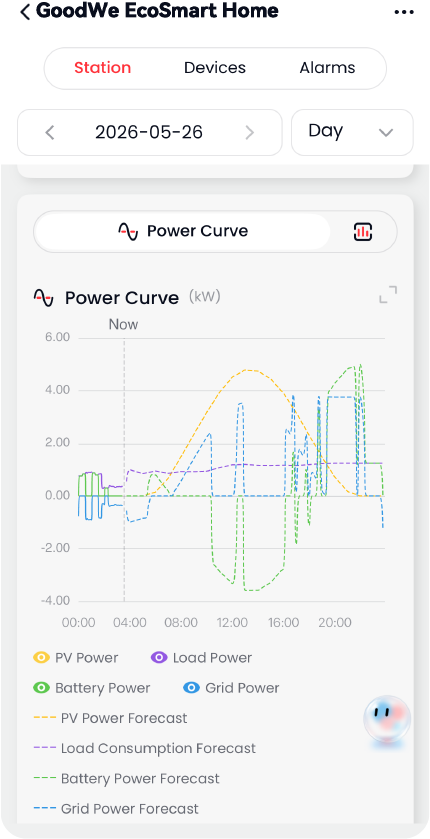
Figure 3. Example forecast view for PV, load, battery and grid power.
Forecasts are estimates. Actual results vary with weather, household behaviour, tariff data and system availability.
When Should You Expand Your ESA Athena S3 Storage?
ESA Athena S3 starts with a 3 kWh battery module and can be expanded, in supported configurations, to five modules or 15 kWh. More capacity is useful only when your generation, demand and backup objective can use it.
Consider expansion if the battery repeatedly fills early, empties before the high-value evening period, or cannot provide the desired backup duration.
A battery that remains at a high SOC through most nights may already be larger than the energy available to cycle economically.
Use seasonal data. A decision based only on a sunny week in summer or a dark week in winter can be misleading.
Battery expansion, compatibility checks and commissioning must be handled through an authorised installer and current GoodWe documentation.
How Should You Operate and Review Your ESA Athena S3?
Daily glance
Check that there are no alarms and that PV, load, battery and grid flows look plausible. You do not need to watch the app continuously.
Weekly review
Review grid import, solar self-consumption, battery high and low points, and any periods of avoidable export. Make one change at a time so you can see whether it helped.
Seasonal or contract review
Revisit TOU schedules, tariff data and backup reserve when daylight patterns, household routines or your electricity contract change. After a firmware or app update, confirm that the time zone, mode, meter data and tariff plan are still correct.
Common mistakes to avoid
Enabling or advertising a 3 kW setting on a plug-in circuit without the required professional connection and approvals.
Assuming that an app limit alone determines the legal maximum power of a plug-in device.
Using a multi-socket adaptor, improvised extension arrangement or damaged outdoor connection.
Running TOU or AI mode with the wrong tariff, time zone or meter direction.
Expecting the BACK-UP output to supply every household appliance.
Changing modes so often that the system never establishes a useful operating pattern.
A five-step starting plan
Confirm the country-approved Athena S3 configuration, installation route and registration requirements.
Verify meter readings, communication, time zone and tariff information with the installer.
Run Self-consumption mode for a normal week and review the daily curves.
Set a backup reserve that matches your critical loads and resilience needs.
Add TOU or AI optimisation only when the underlying data is reliable, then review performance over time.
Used this way, ESA Athena S3 becomes less of a device you constantly operate and more of a home-energy system that quietly coordinates solar generation, battery storage, grid electricity and the priorities you set.


