















Self Use or TOU? Understanding ESA Athena S3 Operating Modes
August 19, 2026


Your solar panels generate clean energy during the day — but you only get the full benefit if your home battery knows when to store it and when to release it. That is exactly what the operating modes of the ESA Athena S3 residential energy storage system control.
ESA Athena S3 can either follow the available solar energy or follow a timetable. The operating mode tells the system which priority to use. Understanding that priority is the easiest way to choose the right setting and avoid unexpected battery behavior.
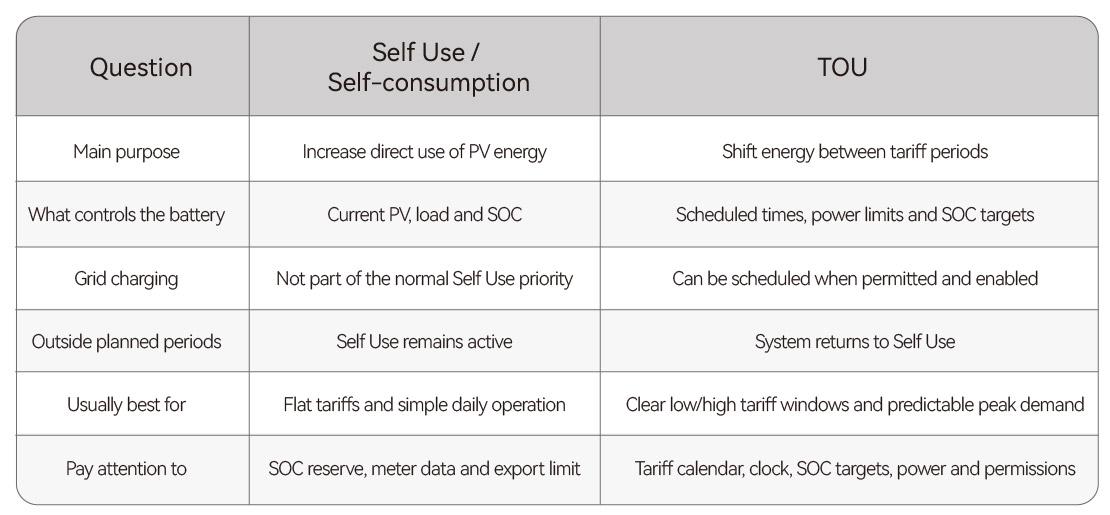
The short answer: Self Use is the everyday baseline. TOU adds scheduled charging and discharging periods. Outside those active TOU periods, Athena returns to Self Use.
Start with the priority, not the menu
In the EMS interface, the base mode is normally labeled Self-consumption. In this article, Self Use and Self-consumption mean the same thing.
Self Use answers: "How can I use more of my own solar electricity at home?"
TOU, short for Time of Use, answers a different question: "When should the battery charge or discharge to move energy from lower-price hours to higher-price hours?"
Both modes use the same PV, battery, household loads and grid connection. What changes is the control priority.
1. Self Use: use your own solar energy first
Self Use is the basic operating mode described in the Athena user manual. It reacts continuously to solar production, household demand and battery state of charge (SOC).
When the sun is producing: PV supplies active household loads first. Surplus PV then charges the battery. If the battery is full, any remaining surplus may be exported to the grid when export is permitted and correctly configured.
When PV is not enough: The battery supports the household until it reaches the configured on-grid SOC lower limit. The grid supplies any demand that PV and the battery cannot cover.
When export is limited: The system follows the configured export limit. Depending on the installation, PV surplus that cannot be used, stored or exported may be curtailed.
A common misunderstanding is that Self Use means "no grid". It does not. The grid remains the final source when solar and permitted battery energy are insufficient. Self Use is usually the best starting point for homes with a flat electricity tariff, regular daytime PV production, or a preference for simple, low-maintenance control.
Self Use in one line: PV -> home loads -> battery -> grid export; when solar is insufficient, the battery steps in first, and the grid covers anything left over.
2. TOU: move energy to the hours when it is worth more
TOU is designed for time-based electricity tariffs— in other words, plans with peak and off-peak prices. It lets the user define charging and discharging plans for selected periods. A typical strategy is to charge during a low-tariff window and discharge during a high-tariff window to reduce expensive grid imports. Grid charging must be permitted locally and enabled for the installation.
TOU is schedule-based. It does not automatically predict tomorrow's cheapest price. Automatic price forecasting belongs to separate energy-management functions. In TOU, the times, power limits and SOC targets are the instructions the system follows.
What happens inside a TOU plan?
Scheduled charging: During a charging window, the normal Self Use priority can be temporarily overridden. The battery may charge from PV and, if allowed, from the grid. Charging stops at the Charge Cut-off SOC. Depending on the plan, the battery may then remain on hold until the charging window ends.
Scheduled discharging: During a discharging window, the battery supplies energy according to the plan. It stops when the Discharge Cut-off SOC is reached or when the end time arrives.
After the window: Athena returns automatically to Self Use. This is why TOU is best understood as a temporary scheduled override, not a completely separate all-day energy strategy.
If planned battery discharge plus PV production exceeds the household load, surplus could flow to the grid unless export control prevents it. Discharge power, export limits and local permissions therefore need to be considered together.
TOU in one line: Charge in the selected low-price period, discharge in the selected high-price period, and use Self Use at other times.
3. Self Use and TOU side by side
Where the two modes appear in EMS
The exact screen design can change with the EMS release, firmware, market and user permission level. The mode names and their purpose, however, remain the key reference.
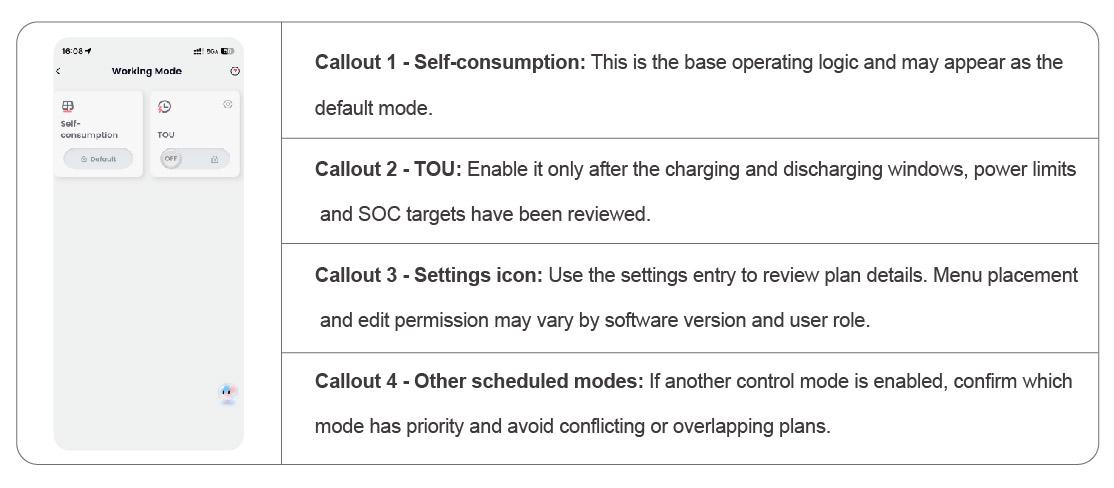
Figure 1. Example EMS Working Mode screen. Additional modes may also be available.
How to build a sensible TOU schedule
Step 1 - Copy the real tariff windows. Use the times published by the electricity supplier. Check weekday/weekend rules, seasonal changes and daylight-saving time rather than relying on memory.
Step 2 - Match the plan to the home. Identify when PV is normally available and when the home uses the most electricity. Charging from the grid just before a sunny morning can leave too little room for free PV energy.
Step 3 - Choose realistic SOC limits. The charge target should store enough energy for the intended peak period. The discharge cut-off should preserve any desired backup reserve and respect the installer-approved settings.
Step 4 - Use appropriate power limits. Very high charge or discharge power is not always useful. Consider the household load, grid import limit, export limit and the system limits configured during commissioning.
Step 5 - Start with one plan and verify it. Run the schedule for several representative days. Add complexity only after the first charge and discharge windows behave as expected.

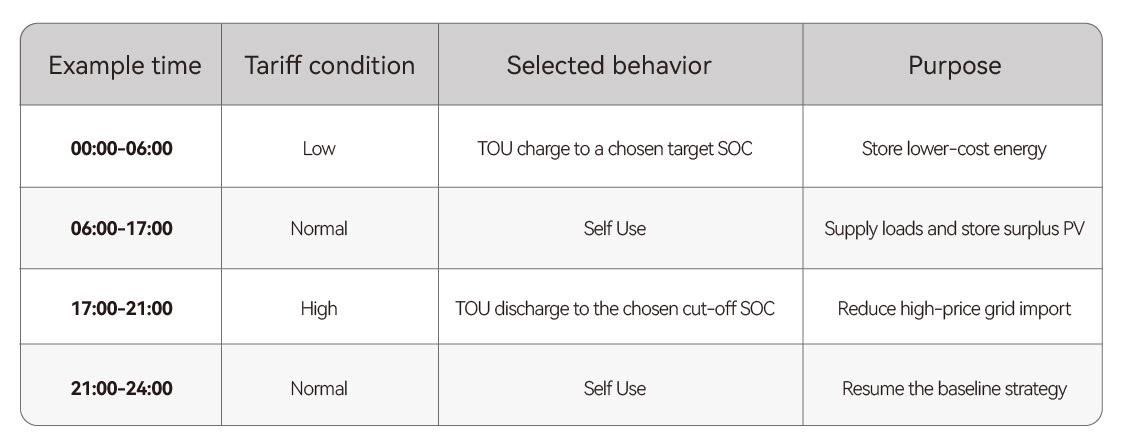
A typical day on a TOU plan
The example below explains the logic only. The correct hours and SOC values depend on the local tariff, season, PV forecast, household demand and desired reserve.
How to check the result with EMS data
A schedule is only useful when the measured behavior matches the intention. The power curve helps show when PV, household load, battery power and grid power change during the day.
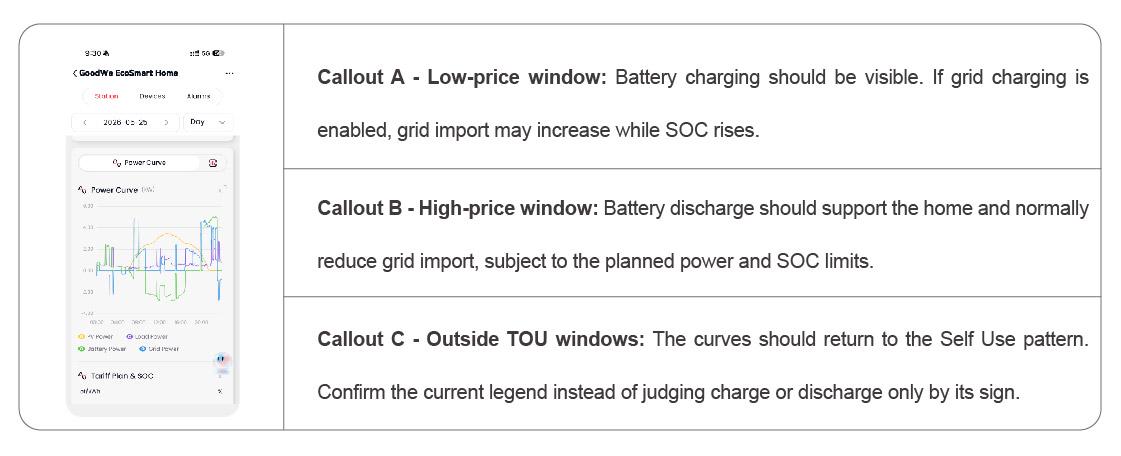
Figure 2. Example EMS power curve showing PV, load, battery and grid power. Curve colors and sign conventions may vary by interface version.
If the result is different from the plan, work through this checklist:
Plan enabled? Check that the TOU plan is switched on.
Clock correct? Confirm the local time and daylight-saving settings.
Battery full? The battery may already be at a cut-off SOC.
Smart meter healthy? Verify smart-meter communication.
Restrictions active? Check whether grid charge or export restrictions apply.
Common mistakes to avoid
Expecting TOU to find the cheapest hours automatically: TOU follows the schedule entered by the user. Recheck the plan when the tariff changes.
Charging too much before a sunny day: A full battery cannot absorb as much surplus PV later. Balance cheap grid energy against the solar energy expected the next day.
Using an unsuitable discharge cut-off: A very low setting can consume energy that the household intended to keep as backup reserve.
Assuming grid charging or export is always allowed: Local rules, contracts and grid settings differ. The installation must follow the applicable permission and export-control requirements.
Ignoring conversion losses: A small tariff difference may not produce meaningful savings after battery and power-conversion losses. TOU improves timing; it does not guarantee a specific bill reduction.
Which mode should you choose?
Choose Self Use when the tariff is flat or simple, the main goal is to use more PV at home, or the household prefers a mode that needs little ongoing adjustment.
Choose TOU when there is a clear and recurring price difference, the peak-use period is predictable, grid charging is permitted if required, and the schedule can be reviewed when tariffs or seasons change.
For a newly commissioned system, a practical approach is to begin with Self Use, verify the smart-meter readings and normal energy flow, and then add one TOU charging or discharging window at a time.
The simplest rule to remember is: Self Use follows the energy; TOU follows the clock.

Related News
-

![20260714-154201.jpg]()
Event
Demystifying Surge Power: How to Safely Manage Home Appliances with Your GoodWe Athena SystemJuly 2026
-
![20260626-143330.jpeg]()
Event
GoodWe PVBM Unveils ESA Athena S3 Series at Intersolar Europe 2026: Reimagining Professional Micro-Storage with Advanced "4S" Design PhilosophyJune 2026
-
![img_v3_02s1_707c3a35-60c0-4e49-bbf1-a6d9db0c649g.png]()
Blogs
Micro Storage Revolution: A Technical Look at the new GoodWe ESA-Athena and the Future of Balcony SolarDecember 2025
-
![1280X1280.png]()
News
ESA-Athena: Simple & Efficient Balcony Solar StorageOctober 2025